Google’s standard version of Android lacks the advanced multitasking features you’d find on skins from Samsung, Motorola, or OnePlus. The company has started to change that, though. Android 16 brought a true desktop mode to Pixels last year, and Android 17 is finally here with a multitasking improvement of its own. App bubbles let Android 17 users condense apps into tiny bubbles that can be opened as floating windows. They’re handy on regular phones, but as I’ve tested Android 17 across multiple Pixels, I realized app bubbles shine on foldables.
Hardware is only half the battle when trying to make the perfect foldable. Software is just as important, since foldables need to help users make the most of the expansive main screen. Google’s foldables have lagged behind in this area, and Android 17 is starting to change that. I used app bubbles on my Google Pixel 9 Pro Fold review unit, and it changed how I multitasked.

I went back to the original Pixel Fold and I actually prefer it over the new one
Google’s first Pixel Fold is short, stout, and somehow more fun to use than most big-screen foldables.
The Pixel Fold has long had a multitasking problem
It doesn’t match the multitasking features offered by Samsung or Motorola
Google’s foldable hardware has come a long way since the original Pixel Fold. The newer Pixel 9 Pro Fold and Pixel 10 Pro Fold models are fit to challenge the best of the best, like the Samsung Galaxy Z Fold 7 or Motorola Razr Fold. The software, however, is a different story. Folding phones finally got great software with the OnePlus Open, as the Open Canvas feature allowed users to juggle between multiple nearly full-screen app windows at once. Other brands have tried their hand at this concept ever since.
Google’s addition of the 90:10 split-screen view with Android 16 gave multitasking on Pixel foldables a similar feel to Open Canvas, but it only worked with two apps. Meanwhile, Samsung’s One UI support for pop-up views expanded the multitasking capabilities of Galaxy foldables. The Razr Fold also supports floating windows and split-screen views, giving it similar versatility. Open Canvas might’ve remained the champ, but other software solutions started to catch up.
Android 17 is starting to breathe life into the multitasking capabilities of Pixel foldables with app bubbles. In theory, any Pixel phone can use app bubbles. But after using them on a Pixel 10 Pro and a Pixel 9 Pro Fold, it’s clear that the experience is much better on foldables. With the Pixel 11 Pro Fold seemingly on the horizon, Android 17’s app bubbles could be just the beginning of Google’s plans for foldable multitasking.
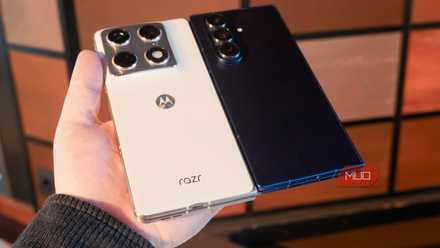
Samsung went for a flashy 200MP primary shooter, while Motorola opted for a well-rounded 50MP trio. I tested both foldables, and this is the winner.
App bubbles make the Taskbar finally feel complete
Bubbles are distracting on regular Pixels, but they’re perfect on Folds
The process for launching and using app bubbles on a regular Pixel is quite simple. Find the app you want to bubble-ify, long-press the icon on the home screen or app drawer. Then, tap the bubble icon. The app opens in a floating window, and can be minimized as a small bubble that lives atop the Android 17 operating system. You can stack up to five apps in a bubble group and quickly switch between the floating windows. However, they tend to get in the way of what you’re doing, especially on smaller phones.
I started using app bubbles on my Pixel 9 Pro Fold, and the user interface was completely different. The steps for creating app bubbles remain the same, but when collapsed, they don’t live on top of your screen. Instead, they become part of the taskbar.
For those unfamiliar, the taskbar is Android’s “dock” for foldable phones and tablets that allows you to launch apps, create split-screen pairs, and more from anywhere in the OS. It’s critical to the multitasking experience on foldables, and you launch it by swiping up from the bottom of the gesture navigation bar.

App bubbles appear in the bottom-right corner of the screen alongside the taskbar. They aren’t found within the taskbar pill, presumably to separate them from regular app shortcuts and recently-used apps. Still, app bubbles work in tandem with the taskbar. When the taskbar is hidden, app bubbles are hidden. When the taskbar is revealed, app bubbles are revealed.
This makes it easy to keep apps running in the background without bubbles cluttering your screen. Personally, I hated conversation bubbles for apps like Google Messages because they got in the way. I dislike app bubbles on regular Pixels for similar reasons. However, on the main screen of a Pixel foldable, the bubbles stay neatly tucked away with the taskbar when not in use.
Android 17’s addition of app bubbles seriously improves the multitasking chops of Pixel foldables. Before, you could use a single split-screen app pair on a device like the Pixel 9 Pro Fold. You can now use a split-screen view with two apps and up to five app bubbles at once, giving you quick access to up to seven apps total at the same time. It’s a game-changer for productivity.
Pixel multitasking still lags behind the competition
Android 17’s app bubbles are a good start, but I hope there’s more to come

Make no mistake, there’s still work to be done before Pixel multitasking is perfect — especially on foldables. Samsung’s One UI 8.5 is still more versatile than Android 17 because it supports multiple resizable floating app windows simultaneously. Android 17 only shows one app in a bubble group at once, and the floating windows can’t be resized.
Plus, creating app bubbles can only be done on the Android 17 home screen or app drawer. You can’t create them from the app switcher, or transform a bubble into a split-screen or full-screen app without restarting it. These limitations make me lean towards using Samsung or Motorola foldables if maximum productivity is your goal, although Android 17 is definitely a major improvement for Pixel foldables.

- SoC
-
Tensor G5
- RAM
-
16GB
- Cover screen
-
6.4-inch OLED
- Main screen
-
8-inch LTPO OLED
The Google Pixel 10 Pro Fold is one of the most feature-rich and affordable foldable phones you can buy right now, with deep Gemini Live integration. It now runs Android 17, unlocking new big-screen multitasking features, like app Bubbles.